Every post on this site used to start the same way: open the repo, create an .mdx file in /posts, write, save, git add, git commit, git push, wait for Vercel, open the URL. The writing was the part I wanted. The rest of the loop was friction sitting on top of writing — small, but the kind of small that compounds. The more posts I wrote, the more I felt the deploy was the thing standing between me and publishing.
So I built a writing room. A small admin under /admin where I can write a post in MDX, hit save, and have it live a couple of seconds later — no commit, no push, no rebuild. Along the way the design language of the rest of the site followed me into the editor, and I ended up rebuilding more than I expected.
The Shape of the Fix
The posts used to live as files in /posts. The blog routes read them at build time via lib/posts.ts — fs.readdirSync, gray-matter, sort, return. That model has one fatal property: posts are part of the build, not part of the data. Any change is a deploy.
There were three reasonable ways out:
- Keep the files, but have an admin route that writes them via the GitHub API. Vercel auto-redeploys on push.
- Move posts to an external store (Vercel Blob, Supabase, anything) and switch the blog to dynamic rendering.
- A real CMS — Sanity, Payload, Notion-as-source.
Option 1 keeps everything in git, which is appealing, but every save is still a 30–60 second redeploy. Option 3 is a sledgehammer for an eleven-post personal blog. Option 2 felt right: blobs are cheap, the storage is already on Vercel, and I can publish instantly.
So: Vercel Blob as the source of truth, lib/posts.ts rewritten to read from there, blog routes go dynamic, and a small /admin to write into it.
Storage and Reads
The store is a thin wrapper. One MDX file per post, keyed by slug, lives at posts/<slug>.mdx in Blob.
export async function saveRawPost(slug: string, source: string): Promise<void> {
  await put(pathFor(slug), source, {
    access: "public",
    contentType: "text/markdown; charset=utf-8",
    addRandomSuffix: false,
    allowOverwrite: true,
    cacheControlMaxAge: 60,
  });
}addRandomSuffix: false plus allowOverwrite: true is the important pair: the URL stays the same across saves, so the blog route doesn't need a separate index of "current URL per slug". The cacheControlMaxAge: 60 is the smallest value the SDK allows, and it matters more than I expected — more on that below.
lib/posts.ts got rewritten to be async and to read from Blob instead of the filesystem. Same gray-matter parsing, same shape of Post and PostMeta, just async. Every caller (app/page.tsx, app/blog/page.tsx, app/blog/[slug]/page.tsx, app/sitemap.ts, app/feed.xml/route.ts, the chat agent, the OG image routes) got an await added.
The Caching Trip
This is where I lost the most time, and it's worth writing down.
My first instinct was the canonical "list once, cache the result, invalidate on save" pattern with unstable_cache:
const loadAllPosts = unstable_cache(
  async () => (await listRawPosts()).map(({ slug, source }) => parsePost(slug, source)),
  ["posts:all"],
  { tags: ["posts"] },
);And on save, call revalidateTag("posts"). Clean.
Except this is Next.js 16, and the cache API was reworked. revalidateTag now takes a required profile argument, and updateTag is the new "from inside a server action" invalidator. I switched to updateTag("posts"), type-checked happy, and shipped it. Then I unchecked the "Published" box, saved, and the post was still live.
updateTag is wired to the new "use cache" directive, not to unstable_cache with the old tags: [...] option. The cache never invalidated. I read the cached, still-published copy back on the next request.
I had two choices: migrate to "use cache" or give up on the cache layer. For 11 posts the answer was obvious — the blob fetches are fast, the parsing is trivial, and a personal blog isn't a hot path. I dropped unstable_cache entirely and made loadAllPosts a plain async function. Page-level caching via ISR could handle the request-level layer above it.
Then ISR bit me too.
The CDN Cache
After dropping unstable_cache, saves were correctly writing published: false to the blob — I could see it in the storage UI — but the blog page was still rendering the post for a while after.
Vercel Blob's CDN was the layer I hadn't accounted for. With addRandomSuffix: false, the URL is stable. With the SDK's default cache headers (one month), the CDN holds onto that URL aggressively. Even with cache: "no-store" on the fetch from the Next server, the request hits the CDN edge, and the edge serves the old MDX.
Two fixes, applied together:
function versionedUrl(url: string, uploadedAt: Date): string {
  const u = new URL(url);
  u.searchParams.set("v", String(uploadedAt.getTime()));
  return u.toString();
}The first is a cache-busting query string. list() returns uploadedAt for each blob; each new save updates it. I append ?v=<epoch> when fetching, which makes the URL look different to the CDN on every save — it falls through to the origin and gets the fresh content. The second is cacheControlMaxAge: 60 on the upload, the minimum the SDK accepts, which keeps the default TTL short as a backstop.
After that, the blog routes also switched from revalidate = 60 to dynamic = "force-dynamic". For a small blog the cost is nothing; the win is "save and refresh — it's there."
When you overwrite a blob at a stable URL, treat the CDN as if it doesn't know anything changed. The cleanest cache-bust is a query string the CDN treats as a new key — not a header.
Auth
A single BLOG_ADMIN_PASSWORD env var, an HMAC of a fixed marker keyed by the password as the session token, and a signed httpOnly cookie. Rotating the env var invalidates every existing session for free.
function sign(password: string): string {
  return crypto.createHmac("sha256", password)
    .update("admin-session").digest("hex");
}The gate sits in a proxy.ts at the project root — Next.js 16 renamed middleware.ts to proxy.ts and the exported function from middleware to proxy. A small thing but it cost me a build cycle to figure out. It matches /admin/:path* and redirects unauthenticated requests to /admin/login.
The Editor, as a Writing Surface
The CMS-shaped first version had a metadata grid at the top — title, slug, date, tags, description, published checkbox — and a body textarea below. Everything visible, everything competing.
I asked myself what Jony Ive would do with the same screen. The answer was straightforward: the artifact is the post. Everything else is housekeeping. The title input should be the title typography itself, not a form field labeled "Title". The body should dominate the page. The metadata should fold away behind a quiet disclosure. The most consequential control — draft vs live — should look the way it sounds, not like a checkbox.
So the editor became three things.
The title. A single input, no label, no border. EB Garamond at title size. The text you type is the page heading. Placeholder reads "Untitled" in --color-border italic.
The body. A larger textarea (32rem minimum), 1px hairline border, generous padding, monospace at a comfortable reading size. Drop or paste an image and it uploads to Blob and inserts a markdown image link at the cursor. A toggle to the right reveals a live preview.
The metadata. Folded into a <details> element labeled with an italic Garamond "details" toggle. Closed by default when editing (slug is locked, the rest rarely changes). Open by default when writing a new post (slug is required).
The footer carries a segmented [ draft | live ] pill next to a single Save button. The Save button's label reflects the toggle's state: "Save" when draft, "Publish" when live. The state at the moment of save is captured in lastSavedAsPublished, so the inline confirmation reads truthfully even after you toggle again afterward.
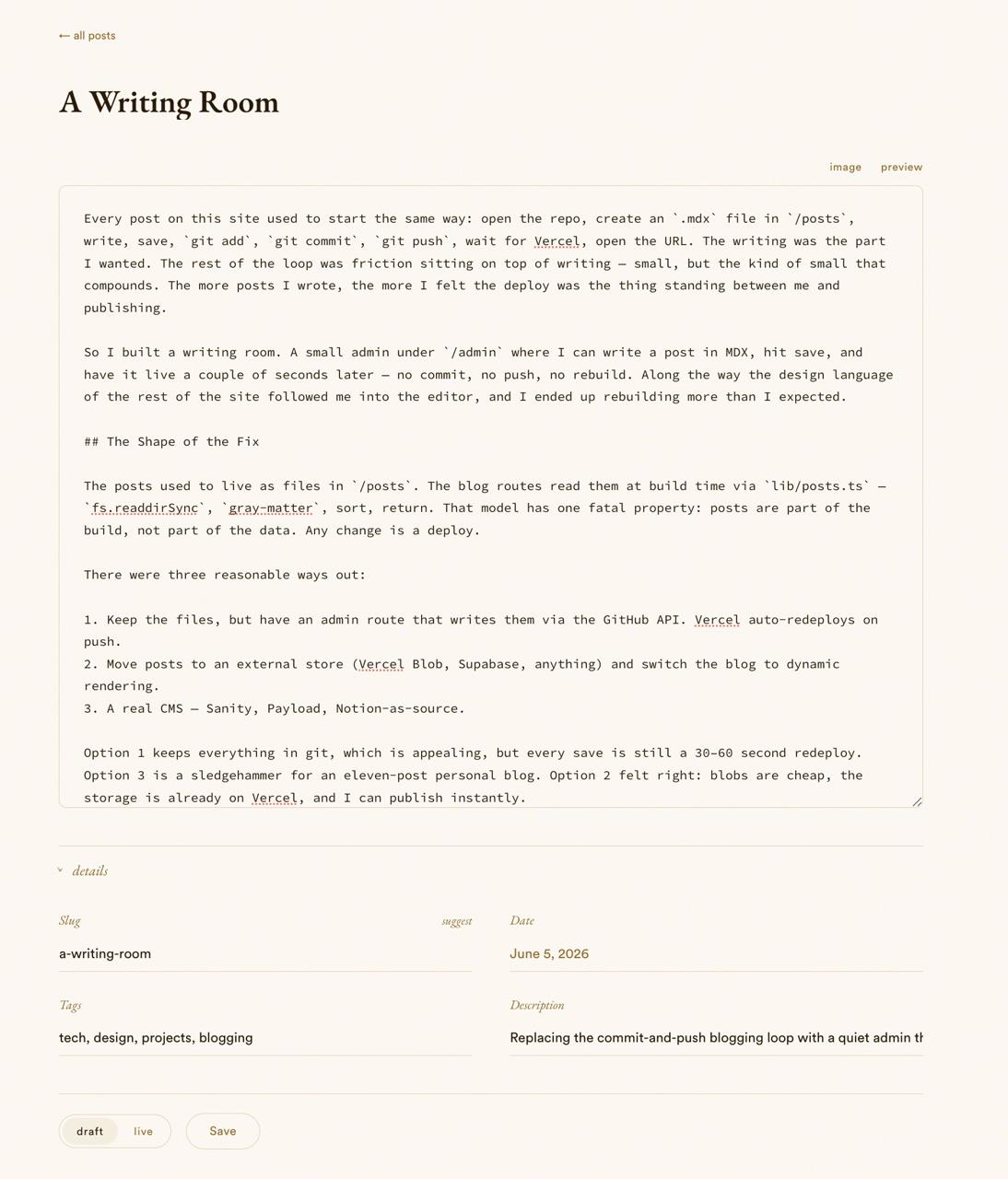
The most consequential control should look the way it sounds, not like a checkbox.
Live Preview, Without Surprises
Production renders MDX with MDXRemote from next-mdx-remote/rsc, plus remark-gfm, rehype-slug, and rehype-pretty-code with the catppuccin-latte theme. The preview needed to use the exact same pipeline, including the custom components (Callout, PullQuote, ImageCaption, and the custom CodeBlock), or it would lie.
The fix was a server action that compiles MDX with next-mdx-remote/serialize, and a client component that renders the compiled source via the client MDXRemote:
export async function compilePreview(source: string): Promise<PreviewResult> {
  try {
    const result = await serialize(source, {
      mdxOptions: {
        remarkPlugins: [remarkGfm],
        rehypePlugins: [rehypeSlug, [rehypePrettyCode, { theme: "catppuccin-latte" }]],
      },
      parseFrontmatter: false,
    });
    return { ok: true, result };
  } catch (e) {
    return { ok: false, error: e instanceof Error ? e.message : String(e) };
  }
}The client debounces by 600ms and renders the result inside <article className="prose"> so the typography matches the live blog post. If the MDX fails to compile, the error renders inline as a small red box instead of crashing the editor. Same plugins, same components, same prose styles — the preview is the production output, not an approximation.
Image Uploads That Feel Like Nothing
I write a lot of posts with screenshots, and the worst part of the old loop was image management — drop a file in /public, write a relative path, hope I remembered the exact filename. The admin handles this in three ways, all of which produce the same outcome: a markdown image link inserted at the cursor, pointing to a Vercel Blob URL.
- Drag a file onto the textarea. A subtle accent-colored border highlights while you're dragging.
- Paste from the clipboard. Cmd-Shift-4 a screenshot on macOS, switch to the editor, paste.
- Click "image" in the toolbar to open a file picker.
All three go through a server action that validates type and size (10 MB max), sanitizes the filename, uploads to posts/images/<slug>.<ext> with addRandomSuffix: true so collisions are impossible, and returns the URL. The client inserts  at the current selection. The live preview picks it up on the next debounce tick.
A Date Picker, Because the Native One Was Ugly
The native <input type="date"> has a popup that's basically unstylable. You get accent-color and color-scheme and that's it — the rest is the OS. After spending an embarrassing amount of time trying to coerce the WebKit calendar indicator into matching the site's chevrons, I gave up and built a custom one.
It's a small DatePicker component: a trigger button that looks like the other detail fields, a popover that floats below it on click. Inside the popover: italic Garamond month header with chevron arrows, uppercase day-of-week labels in --color-muted, a 7-column grid of square day cells, "today" highlighted in --color-accent, the selected day filled with accent against the cream. A hidden <input name="date"> carries the yyyy-mm-dd value to the form, so the server action is untouched.
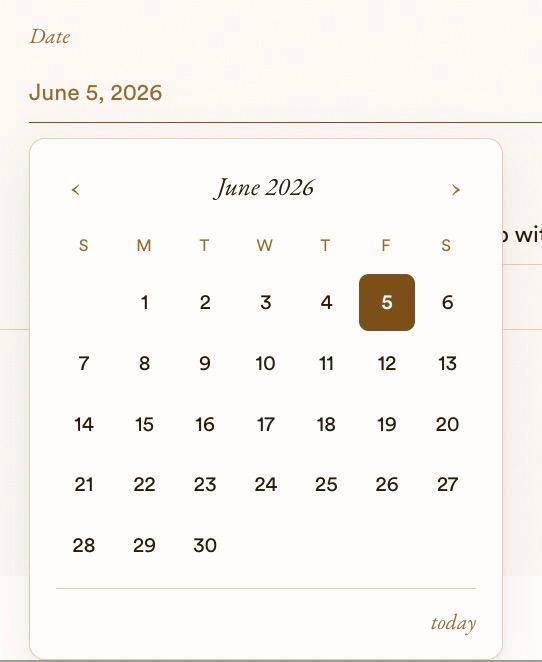
toLocaleDateString(undefined, ...) renders differently on the server (US English, Node's default) and the client (browser locale). "June 5, 2026" on the server, "5 June 2026" on the client. The fix was to format manually with a hard-coded English months table. Locale-aware formatting belongs nowhere near server-rendered content unless you've explicitly pinned a locale.
Slugs That Write Themselves
Asking the writer to type a slug is a small tax on writing. The slug is just kebab-case(title) ninety percent of the time. I made the slug field auto-derive from the title as you type, lock the moment you edit it manually, and added a "suggest" link that asks Haiku for something sharper.
export function titleToSlug(title: string): string {
  return title
    .toLowerCase()
    .normalize("NFKD")
    .replace(/[̀-ͯ]/g, "")
    .replace(/&/g, " and ")
    .replace(/[^a-z0-9]+/g, "-")
    .replace(/^-+|-+$/g, "")
    .slice(0, 60)
    .replace(/-+$/g, "");
}The LLM path goes through the same LiteLLM endpoint the chat widget already uses, prompted to return a 2–5 word kebab-case slug given the title and a short body excerpt. The server action validates the response against SLUG_PATTERN and falls back to titleToSlug if the model returns anything weird — so the link always succeeds, the model is allowed to be wrong.
When you let an LLM produce a constrained string (slug, ID, filename), always validate the output against the constraint and have a deterministic fallback ready. The user shouldn't see a failure when the model gets creative.
Small Details
A few things that don't justify their own section but were worth doing:
- The login page is a single centered password field with no label, no header, and an "enter" verb below it. The error message is absolutely positioned at
top: calc(100% + 1.25rem)so it fades in below the button without nudging the field out of vertical center. - Native HTML form validation is suppressed with
noValidateandrequiredremoved. The server validates and returns inline messages in italic Garamond. No browser tooltip. - The admin list is an editorial index: hairline rows, Garamond titles, monospaced date on the right. The "draft" state is italic Garamond "— draft" rather than an uppercase chip — content, not chrome.
- Every admin surface enters with a 6px lift and a 450ms ease-out. Calm motion, not bouncy.

What I Got Back
A workflow that looks like this: open /admin, type, click Publish, refresh /blog/<slug> to see it. Two seconds. No git, no terminal, no waiting for a deploy. The friction is gone, and the editor itself feels like a place to write rather than a CMS to wrestle.
What I didn't expect was how much the Ive lens — reduce, honest materials, restraint, single object — would change how I felt about the rest of the site. The same lens applied to the login page produced something quieter than I would have designed alone. The same lens applied to the editor turned a form into a writing surface. Working through this loop a few times made me think harder about what the artifact is on every page, and what's just housekeeping that can quietly fold away.
I'll write the next post here, in the room I just built.